APPSHIELD / THE REVIEW PACKAGE
See what your team
can actually use.
A scoped decision, evidence you can follow, and corrections you can act on. This worked example follows the same Dayform app shown on the homepage.
Fictional sample, not a client result. The app, submission materials, observations, and proposed interfaces below are illustrative. No customer approval, completed implementation, or successful retest is claimed.
The decision has boundaries.
EXAMPLE SUBMISSIONDayform / 1.8 (42)ILLUSTRATED SCOPEInterface · account flow · privacy choicesPOLICY CONTEXTGoogle Play / sources checked September 7, 2026EXECUTION STATUSIllustrative scenario; no real build tested
EXAMPLE RECOMMENDATIONFix before submission.
Three documented discrepancies need action. The B designs show proposed corrections. Their implementation and acceptance checks remain open until supported by recheck evidence.
FINDING 01 / App experience
From a template to a reason to come back.
AAS SUBMITTED
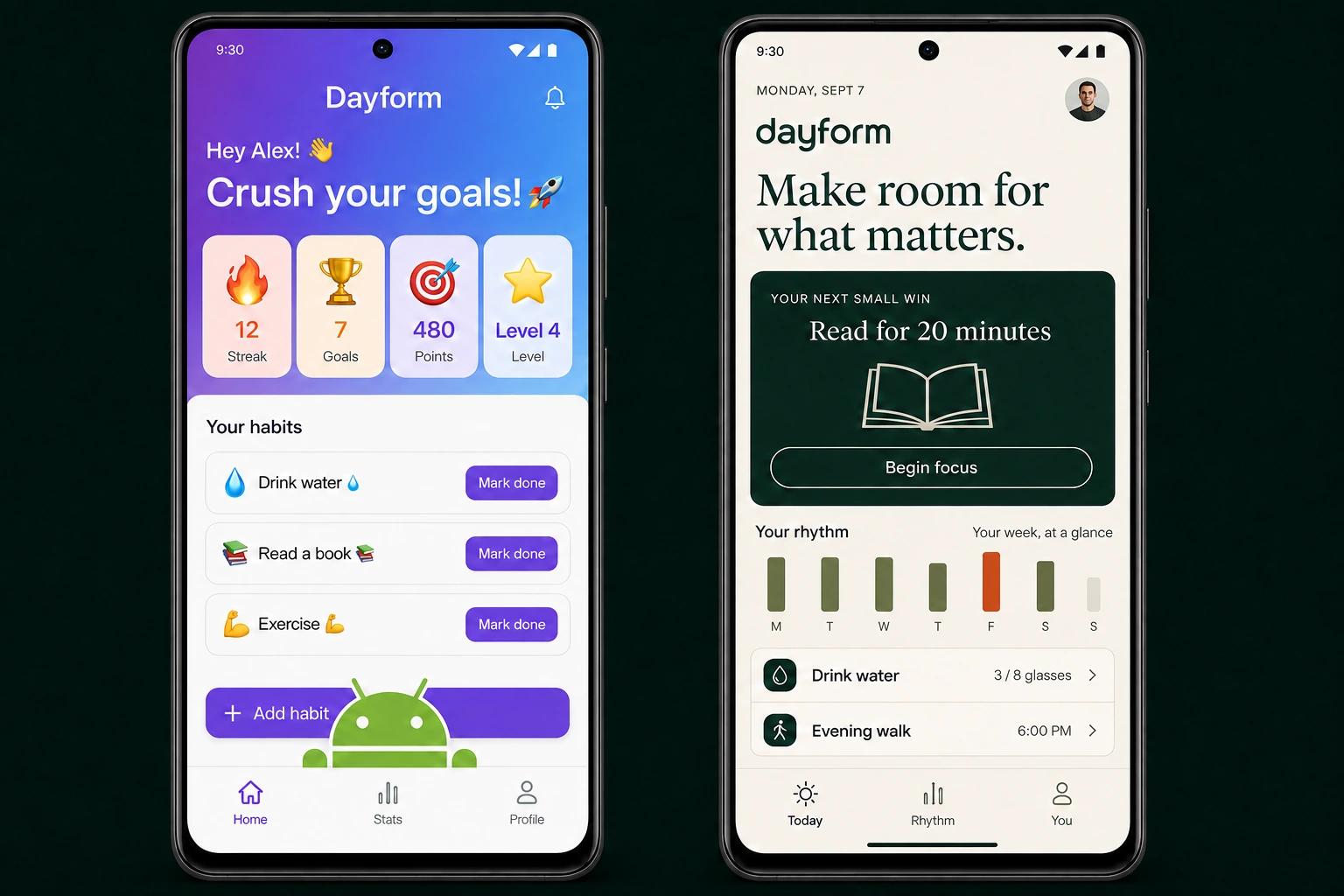
Decoration competes with the task.
Emoji stat cards all shout at once. The Android mascot sits over Add habit, putting decoration in the way of a useful action.
BPROPOSED DIRECTION
One clear next step. A distinct identity.
An editorial identity, a focused reading session, meaningful progress, and controls with room to work. The same idea, made deliberate.
THE REVIEW BEHIND THE CHANGE / 01A finding your developer
can act on.
A habit tracker should help someone take their next small step. This direction makes that purpose visible immediately.
THE HANDS-ON WORKIn a real review, open Today on the supplied build, try Add habit, check the bottom controls at the agreed screen sizes, then trace the primary task. Separate reproducible obstruction from subjective design advice.
What gets handed over
- Remove the mascot from the controls and reserve system-navigation space.
- Prioritize one meaningful next action; make habit progress and scheduling explicit.
- Use a consistent type hierarchy, restrained palette, and coherent icons; verify the revised flow in the build.
Recheck acceptance conditions
- Add habit and navigation remain visible and tappable at agreed sizes.
- Begin focus opens the intended reading session and progress reflects actual state.
- Large text and system navigation do not cover actions; design choices remain identified as recommendations.
Inspect the evidence and scope +
- Observed in this fictional example
- This fictional Dayform screen gives four decorative counters equal emphasis and places an Android mascot over Add habit. The proposed screen prioritizes a reading session and separates the navigation from content.
- Reproduction path
- Today → Add habit → return to Today → inspect bottom navigation and the next habit action.
- Evidence references
- E-01 · generated A home screen: competing counters
E-02 · generated A home screen: mascot overlaps Add habit
E-03 · proposed B home screen: focus action, useful progress, clear navigation - Basis
- Control visibility and usability are quality concerns. The typography, palette, and icon direction are design recommendations; emojis alone are not a policy violation. Android: Core app quality ↗
- Implementation owner
- Developer / product designer
- Scope boundary
- Generated concept screens demonstrate a proposed direction, not a tested app or measured conversion result. A review provides correction guidance; a full redesign or implementation requires its own agreed scope.
FINDING 02 / Account flow
Turn an account dead end into a clear exit.
AAS SUBMITTED
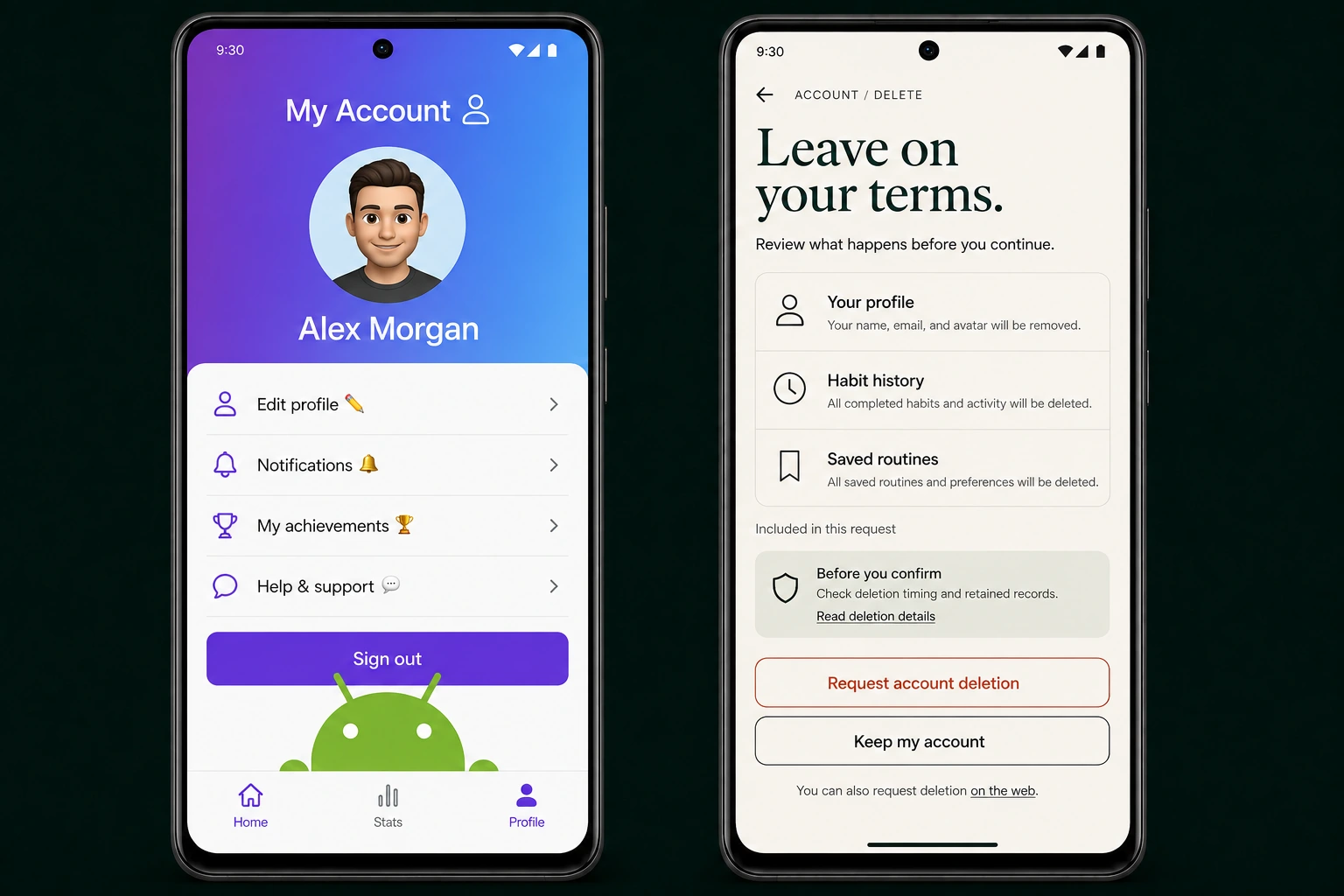
Sign out is the last available action.
A generic profile ends at Sign out. There is no visible deletion entry, and the mascot crowds the bottom controls.
BPROPOSED DIRECTION
A clear exit, with room to make a decision.
The proposed confirmation names the affected information, points to deletion details, and separates Request deletion from Keep my account.
THE REVIEW BEHIND THE CHANGE / 02A finding your developer
can act on.
Users can find the request and understand its purpose before acting.
THE HANDS-ON WORKIn a real review, follow You → Account and Help & support, attempt to reach a deletion request, and inspect the supplied web deletion resource. Record the exact route and any missing evidence.
What gets handed over
- Add a prominent Delete account entry and a functioning request path.
- Explain affected data, actual timing, and applicable retention before confirmation.
- Publish the app-named web deletion resource and supply its link for the Google Play submission.
Recheck acceptance conditions
- Request path is reachable using the test account.
- Web request resource works without reinstalling the app.
- UI wording matches owner-supplied process details; unverified backend erasure stays marked unverified.
Inspect the evidence and scope +
- Observed in this fictional example
- In this fictional scenario, Dayform Account ends at Sign out. Help & support does not supply a deletion path, and the submission deletion URL is blank.
- Reproduction path
- You → Account → Help & support; inspect the supplied deletion URL.
- Evidence references
- E-01 · generated A Account screen: no deletion entry
E-02 · fictional support-path and blank-URL scenario
E-03 · proposed B confirmation: affected data, details, and distinct actions - Basis
- For applicable Google Play apps with account creation, both an in-app deletion path and a web request resource are required. Google Play: Account deletion ↗
- Implementation owner
- Developer / account-service owner
- Scope boundary
- B illustrates a proposed confirmation reached from a new Delete account entry. Actual timing, retained records, web access, and backend erasure require implementation evidence; a rendered screen does not establish them.
FINDING 03 / Privacy choices
From a privacy slogan to understandable choices.
AAS SUBMITTED
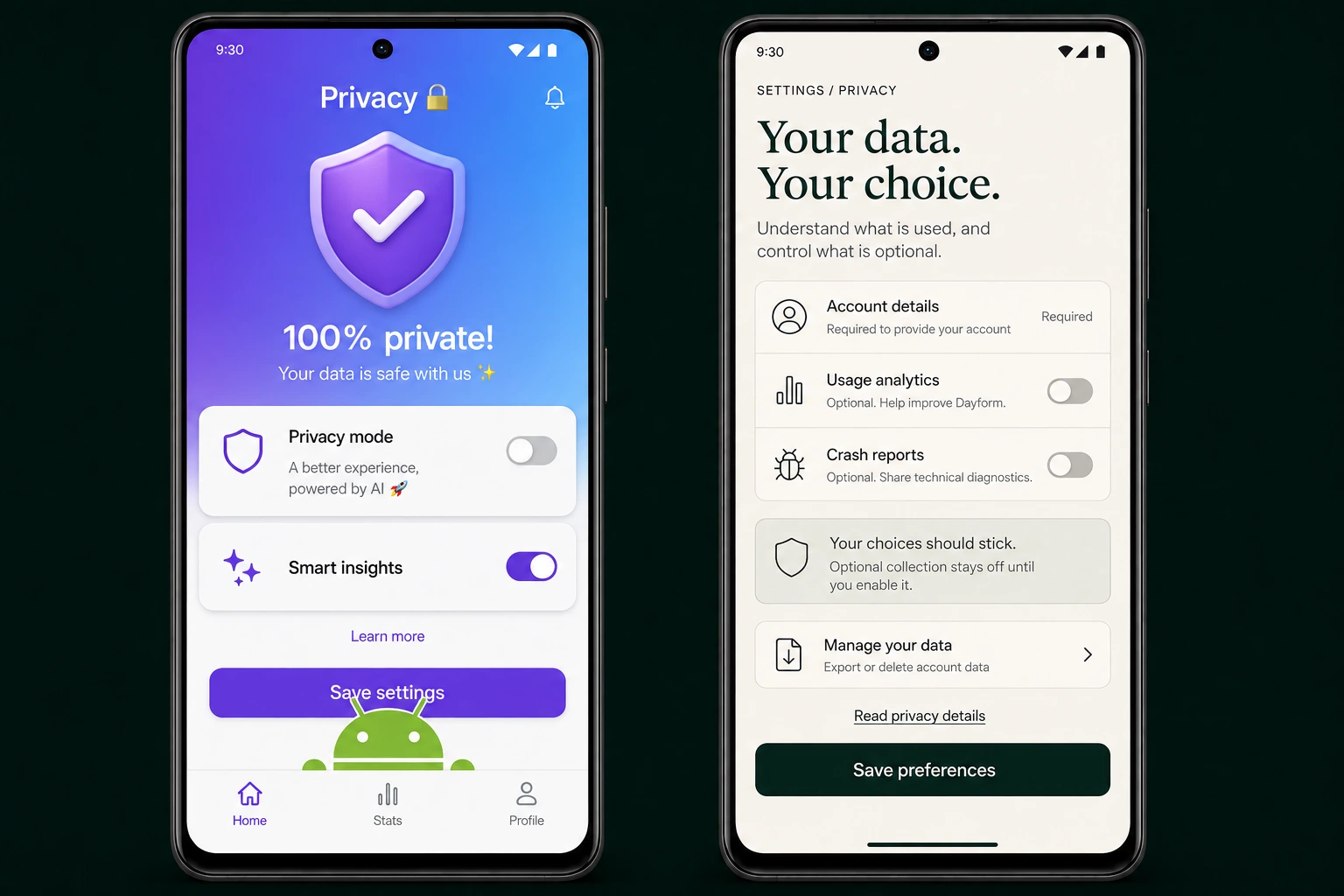
A blanket promise. Unclear controls.
“100% private” sits above vague Privacy mode and enabled Smart insights. The screen never explains what those controls change.
BPROPOSED DIRECTION
Specific choices, explained where they matter.
Required account data is distinguished from optional analytics and crash reports. Each choice has a purpose, and Save preferences has its own clear space.
THE REVIEW BEHIND THE CHANGE / 03A finding your developer
can act on.
People can understand what is required, what is optional, and where to manage their data. The implementation must support every promise.
THE HANDS-ON WORKIn a real review, compare the privacy wording and draft declaration with the SDK inventory and supplied test events. Exercise each toggle, relaunch the app, and request evidence for facts the client cannot establish.
What gets handed over
- Replace blanket claims with accurate purposes and a clear distinction between required and optional processing.
- Implement preferences that persist and govern actual collection; map SDK behavior, recipient roles, retention, and sharing to evidence.
- Align the declaration, policy, and in-app explanation. Keep unresolved data-handling questions open.
Recheck acceptance conditions
- Optional collection stays off before consent and after relaunch when disabled, supported by behavior evidence.
- Every revised declaration answer cites evidence, including third-party components.
- Owner confirms purposes and handling; backend unknowns remain explicitly unverified.
Inspect the evidence and scope +
- Observed in this fictional example
- The fictional A screen claims 100% private while Smart insights is enabled. The scenario pairs a No data collected draft with an illustrative habit_completed event and identifier demo-7f2a sent to analytics.example.
- Reproduction path
- Privacy → inspect choices → compare declaration and SDK inventory → change preference → relaunch → inspect supplied event evidence.
- Evidence references
- E-01 · generated A privacy screen: blanket claim and vague controls
E-02 · fictional declaration and SDK inventory
E-03 · illustrative habit_completed event, demo-7f2a → analytics.example
E-04 · proposed B privacy choices; behavior not yet verified - Basis
- Google Play asks developers to account for data handled by the app and included third-party components. Google Play: Data safety ↗
- Implementation owner
- Developer / data-handling owner
- Scope boundary
- B is a proposed interface, not a completed Data safety declaration or privacy audit. OFF toggles and explanatory copy do not prove collection behavior or server-side handling.
A correction is a proposal until it is checked.
The sample checklist leaves every item Awaiting implementation / not rechecked. In a real focused recheck, the report records the submitted correction, the evidence inspected, and whether the original condition is supported, still open, or not evaluated.
Only originally flagged items are covered. New builds or broader changes require the written scope to be confirmed; a reviewed screenshot does not establish unrelated behavior or backend handling.
What this sample cannot establish
No real client build was exercised. The illustrations do not establish backend deletion, full data handling, purchase behavior, other devices, or an app-store decision. A paid review records its actual environment, reachable flows, evidence, and limitations.
Bring your submission into focus.
Introductory $99 for one accepted single-store scope. PDF and Markdown report, written clarification, and one focused recheck. Delivery is normally 24–48 hours after intake confirmation; the written acceptance and service terms govern.
Request a review ↗